
For engineer-to-order manufacturers
Where are you starting from?
Quote your engineered product in minutes, with the drawing attached.
MetaModel turns the rules in your quoting spreadsheet into a live configurator: one model that holds the engineering, the manufacturing rules, the materials and the labor — and gives back 3D, a dimensioned drawing and a complete quote, not just a price. Your estimators build it, not a CAD team. On your website it turns visitors into complete RFQs.
One live model — engineering, manufacturing, materials, labor — so the drawing and the quote can never disagree.
Not a door app. Not a utility vault app.
MetaModel is the ETO platform where you build your app.
Kestrel Vessel Works
Pressure vessel
ASME VIII-1: shell and head thickness by UG-27 and UG-32, plate rounded up, MAWP back from the plate, flange class, nozzle schedule, weights, drawing and price.
Halvorsen Stainless
Process tank
Working volume in. The shell gauge, jacket, insulation, agitator, manway, CIP and a nozzle schedule checked for interference — weights, drawing and price follow.
Tallgrass Planter Co.
Row-crop planter
Rows and spacing in. The frame goes rigid, pull-type or vertical fold; the row units take their meter, hoppers or bulk fill, cleaners, down force and fertilizer; the wings fold for the road.
Ridgeline Precast
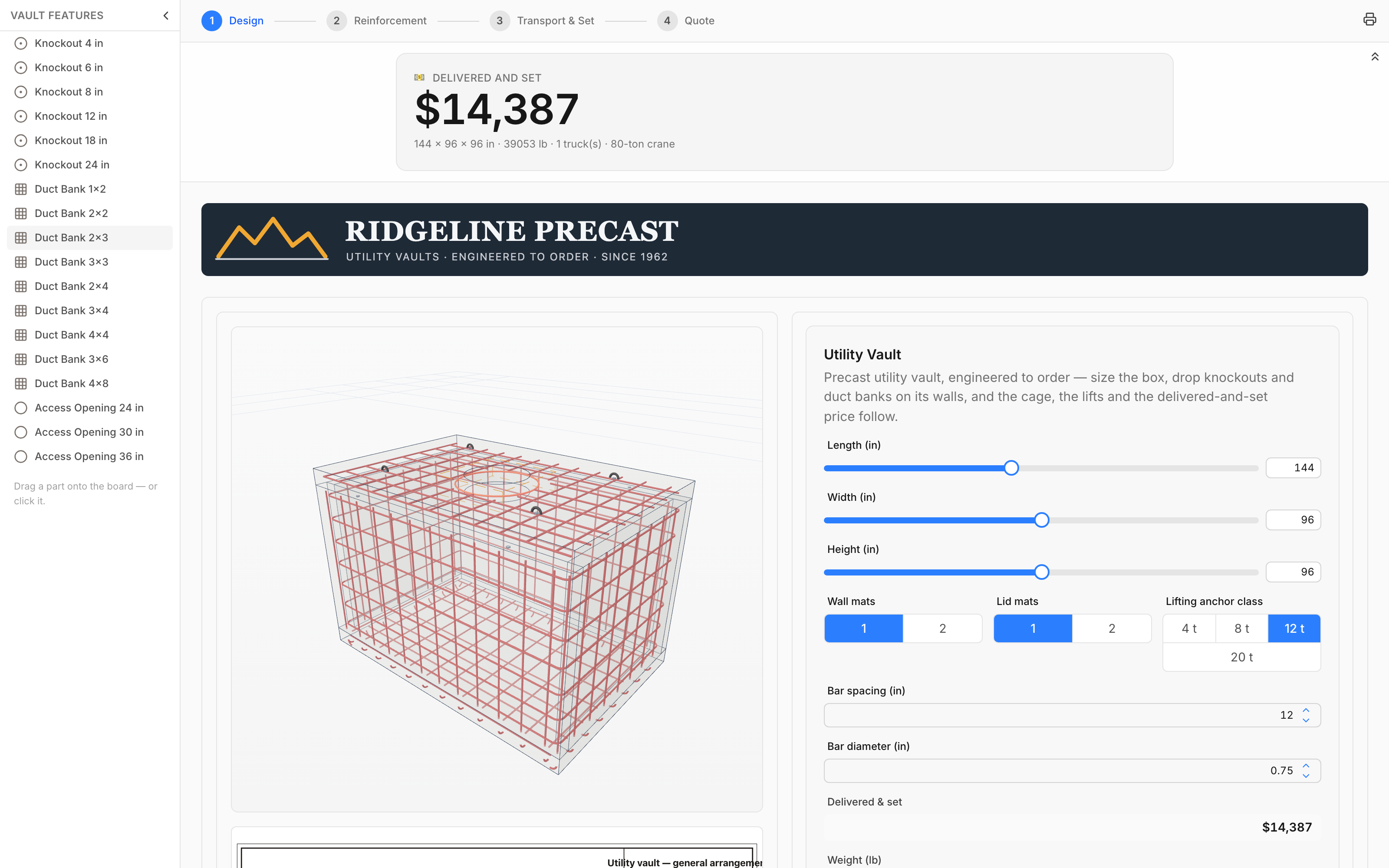
Utility vault
Drag a duct bank onto a wall. The rebar cage re-routes around it; the lifting anchors and the crane class follow the weight.
Calder & Voss
Hydraulic cylinder
Bore, stroke, pressure, mount. Buckling picks the rod from the standard ladder; the mount reconfigures in 3D.
Northfork Framing
Framed building
Studs, gable studs, rafters cut with bird's mouths. A window on a wall and the framing re-cuts around it.
Halden Door Co.
Industrial door
Single or pair, size, gauge, hardware. Hinges follow the height rule, panic bars appear as parts, the price builds from tables.
Built for you
Your first configurator, built for you. Free.
Send us what you have — a description, the spreadsheet you quote from, drawings, your website — and our engineers build it: inputs, rules, 3D, drawing, price. It is yours to keep and change, and it goes live on your site when you say.
- 1 Send what you have
- 2 We build it
- 3 You review, we refine
- 4 Live on your site
Rather email it? support@metamodel.app — attach the spreadsheet and anything else.
Demo — a fictional company, a real app
Ridgeline Precast's ETO instant-quote app, built on MetaModel in days: configure, reinforce, price, drawing, RFQ — as it would sit on a real precaster's website.
Engineer-to-order, all the way
A precast utility vault — configured, reinforced, quoted. In the browser.
Slide the box. Drag a duct bank onto a wall and slide it where the conduit comes in. The rebar cage re-routes around every opening — hoops round the corners, U-bars through the floor — the lifting anchors and the crane class follow the weight, the drawing re-dimensions, and a delivered-and-set price is one email away. A parts bin and a design catalog ship with the page. Modeled, not programmed.
Four ways to start
Start from a template — or build it your way.
Pick a ready-made calculator and change the numbers, describe what you need and let AI build it, turn an Excel workbook into a live app, or start from a blank page and build it by hand. Every path lands in the same editor — an Excel-like workspace where a formula bar, a rule bar, and a property editor make building from scratch as easy as writing a spreadsheet.
From a template
Pick a ready-made calculator and change the numbers to yours.
From AI
Just describe what you need — the AI Companion builds the model.
From Excel
Turn a workbook — formulas and all — into a live app.
From scratch
Start blank and build it by hand with formulas and rules.
The same editor every path lands in — a formula bar, a rule bar, live 3D with an automated 2D drawing, and a property editor. Click to enlarge.
Calculators too
The same engine does the money side of the sale.
Financing, payback, lease versus buy, cost of ownership: MetaModel also builds the financial and analytical calculators that sit beside an engineered product. Put one in the same project and it reads the configurator's price directly, so the monthly payment moves when your customer changes the size. Or start from a ready-made template. Each one is a real model you can open and edit, not a locked form.

How it works
Model it
Formulas you already know, cross-model references, live recalculation. If you can build it in a spreadsheet, you can model it here.
Add rules
Rules that create parts, select standard components, place geometry, and check the result. The model reconfigures itself as inputs change.
Publish it
One click. Visitors get a live app; developers get an API; AI assistants get a tool. Same model, no code.
Publish once
One model, three surfaces
The same published model is simultaneously all three. No exports, no rebuilds, no drift.
An interactive app
A live page anyone can use — sliders, forms, 3D, drawings. Embeddable in any website with one script tag.
A REST API
POST inputs, get computed outputs — evaluated server-side by the same dependency-tracked engine the page runs.
An MCP tool
Any AI assistant can discover your model, read its schema, and compute real answers with it. No integration project.
Computed, not guessed
Your model, callable by any AI assistant
Add https://www.metamodel.app/api/mcp as a connector and every calculator you've published becomes a tool the assistant can actually use. It discovers the inputs, sends real values, and gets results computed by the same dependency-tracked engine the live page runs. Language models guess at arithmetic. Yours doesn't.
metamodel_list_projectsIt finds your calculators.
The assistant sees what's available to compute against.
metamodel_get_schemaIt reads the contract.
Every input with its type, defaults and valid range; every output. 3D presentation models are flagged so the assistant knows what's engineering and what's display.
metamodel_computeIt computes for real.
Formulas, lookups and rules evaluated server-side. Numbers come from the engine, not the language model.
True story
An AI assistant exploring the cylinder configurator through these tools noticed the rod-sizing check only guarded one direction. Digging in revealed the real issue: at short strokes, buckling stopped governing and the model could select a rod past its compressive yield. The fix shipped the same day.
Your configurator, inside the assistant your customer already uses. Publish a model and it's reachable from Claude, from an internal agent, from whatever your customers run — no integration project, no SDK, no keys.
The MCP server is open source (github.com/metamodel-app/mcp-server) and published-calculator compute needs no auth. Developer docs →
Embedded in the wild
Real MetaModel apps, living on other pages
Anyone can code an app in months. These were modeled, not programmed — the deal-shopper in under 15 minutes, the full 3D configurator in a day — with spreadsheet-style formulas and rules, no code, AI assistance when you want it. Then one script tag drops them into their host sites.
Consumer
TeeScout — t-shirt deal shopper
Four vendor pricing models race live; drag a fifth in from the parts tray and it arrives already priced.
Industrial
Calder & Voss — cylinder RFQ
Live 3D, a dimensioned drawing, quote capture and an engineering assistant — embedded on a manufacturer's page.
Engineer-to-order
Ridgeline Precast — utility vault configurator
Size the box, drag knockouts and duct banks onto its walls, slide them — the rebar cage re-routes around every opening, the lifting anchors and the crane class follow, the drawing re-dimensions, and a delivered-and-set quote is one email away. A parts bin and a design catalog ship with the page.
Each of these is the same one-line embed — pasted into its host site:
<script src="https://www.metamodel.app/embed.js" async></script>
<metamodel-embed token="…"></metamodel-embed>
That's the entire integration. Ship an interactive calculator on a client site this afternoon, without a build step, a framework, or a developer.
One tool, from a price comparison to a 3D configurator.
Start
A comparison widget, embedded with one script tag.
Four vendor pricing models race an order live. Modeled in under 15 minutes, dropped into its host page with a single script tag.
Further up
Real formulas, live recalculation, published to a page.
Loan math with affordability indicators, code-compliant deck sizing from decision tables, five interconnected building models — spreadsheet-class logic as live apps.
The ceiling
Engineering rules, standard-part selection and live 3D — same tool, pushed all the way.
Buckling selects the rod, rules reconfigure the mounting in 3D, and the dimensioned drawing follows. CAD outputs files. This outputs an interface.
Same engine, same formulas, same one-line embed. The difference between the first and the last is how much model you wrote.
Live examples
These are live MetaModel projects. Change the inputs and watch everything recalculate — no account needed.
T-Shirt Sourcing Comparator
Start simpleFour vendor pricing models race your order live. Drag a fifth vendor in — it arrives already priced.
Car Loan Calculator
Start simpleMonthly payment, total interest, and affordability indicators — the classic calculator, live.
Deck Builder
Start simpleCode-compliant deck sizing with state-specific lookups and a full cost estimate.
Building Engineer
Go deepFive interconnected models size HVAC, electrical, and lighting from room dimensions.
Conveyor Section Configurator
Go deepLength and load drive roller count and spacing; motor selection comes from real drive tables.
Hydraulic Cylinder Configurator
Go deepBuckling selects the rod, rules swap the mounting in 3D, and the drawing re-dimensions live.
Build your first model today
Free to build. Buy it for $25 to publish — no subscription.